
The brief
A café in Indonesia wanted less manual inventory calculation and a realistic view of what each sale costs and earns. A till alone records the sale, but not the ingredients it used, its cost, or the profit it made.
The goal was a point-of-sale and operations system that does that work automatically. Staff take orders on an iPad, and each order deducts the right ingredients, records its cost and profit, and prints a ticket. Owners get stock, purchasing and profit reporting they can trust.
Discovery: one order, followed from start to finish
We planned the product around a single question: what has to happen, reliably, every time a cashier taps Submit? Answering it produced the core flow of the system:
The staff member builds the order on the iPad and submits it.
The system checks that the menu items are available and that there is enough stock for their recipes.
It saves the order with a snapshot of prices and costs at that moment.
It deducts each ingredient from stock through a recorded movement.
It calculates cost of goods sold, gross profit and margin.
It creates a print job, and the printer prints the ticket or receipt.
One principle shaped everything else: stock is deducted when the order is saved, not when the printer succeeds. Printers jam and lose connection. A failed print can be retried without taking the ingredients out of stock twice.
We also agreed what the first release would not include: online ordering, delivery, loyalty, payroll, payment gateways and full accounting. That kept the MVP focused on getting the core of the business right.
Designing for a busy counter
We designed two distinct experiences. The POS is a focused workspace for an iPad in landscape: categories along the top, large menu cards, a cart that stays on screen, and a clear total and Submit button. Touch targets are large, unavailable items are visibly disabled, and cost information is never shown to cashiers. The theme is light-first because the screen is used in a bright café.
The back office is calmer and denser, closer to tools like Linear and Vercel, with a narrow sidebar, strong page titles, compact filters, structured tables and subtle status badges. Prices, quantities and margins use tabular figures so columns line up and numbers are easy to scan.
Restraint was a deliberate choice: few colours, thin borders, almost no decoration, and one accent reserved for primary actions and selected states. The interface feels simple while the inventory and profit logic underneath does the heavy lifting.
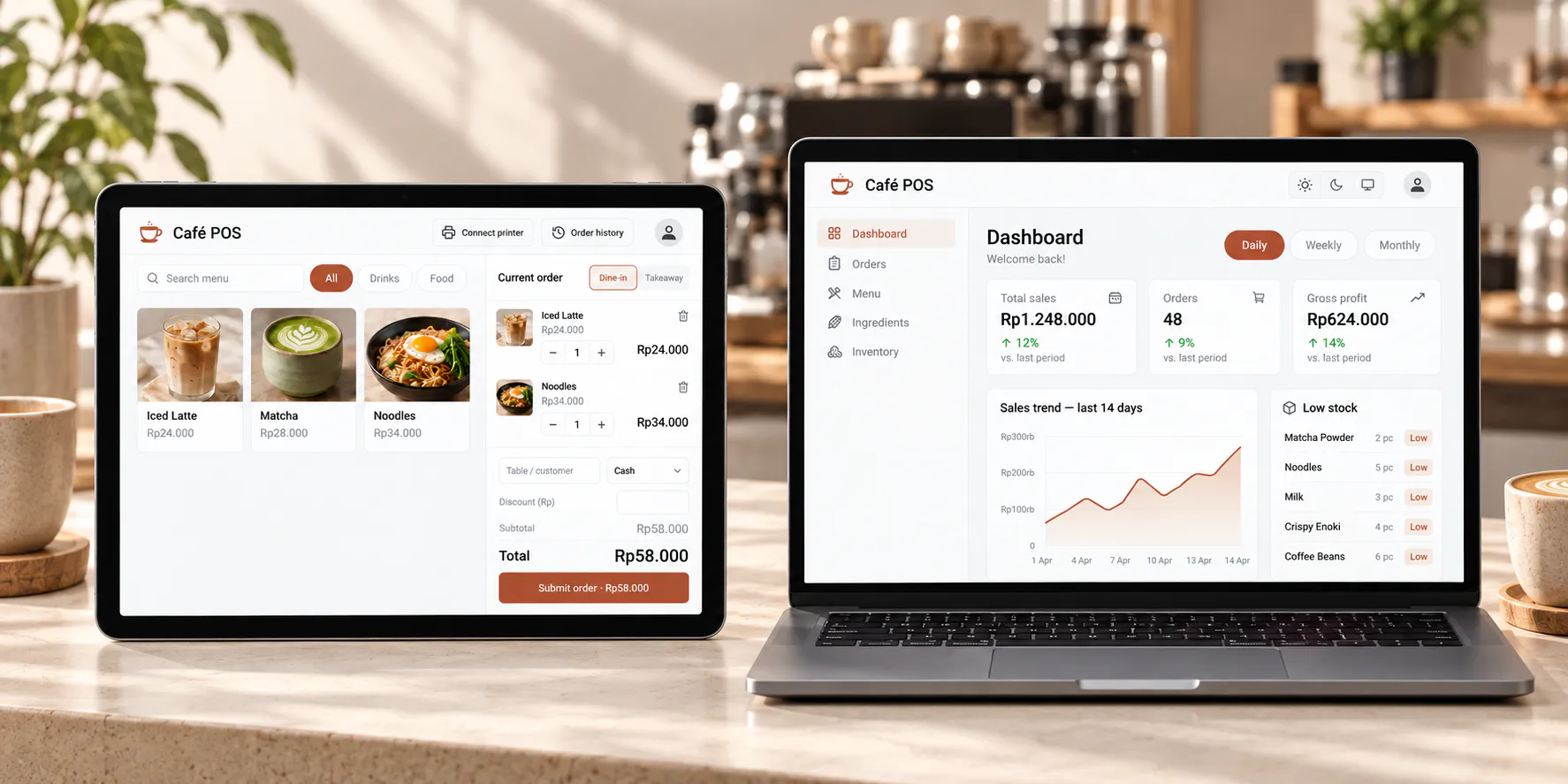
Illustrative POS and owner dashboard with sample data.
Building it
The café POS is a Next.js web application on PostgreSQL. We built the database and business rules before the dashboard, because the numbers had to be right before they could be shown. A few decisions do most of the work:
Money is never a decimal. Prices are stored as whole Rupiah, and calculations use exact integer arithmetic, so totals never drift from rounding.
Recipes are versioned. Editing a recipe creates a new version, and past orders keep the costs they were sold at.
Stock is a ledger. Sales, purchases, waste, adjustments and stock counts are all recorded movements. Purchases update the weighted-average cost of each ingredient.
Submitting an order is safe to repeat. Each submission carries a unique key, so a double tap or a lost connection cannot create a second order or deduct stock twice.
Printing sits behind an interface. The printer can be swapped for different hardware without touching order logic, and there is a browser fallback when no printer is available.
Permissions are opt-in. Each role (Owner, Manager, Cashier, Inventory staff and Viewer) can do only what it has been explicitly granted.
We delivered in phases: foundation and permissions; menu, ingredients and recipes; inventory; the POS and order workflow; printing; dashboard and reports; then staff management, audit and hardening.
The final product
POS: fast ordering with sizes, add-ons, notes, dine-in or takeaway, tax and service charge, and a draft that survives a page refresh.
Menu and recipes: categories, items, variants and modifiers, each linked to the ingredients it uses, with live cost and margin.
Inventory: purchases, waste, manual adjustments, a guided stock count and a low-stock view.
Orders: full history with the cost and gross profit of every order, plus cancellations and refunds that return stock correctly.
Dashboard and reports: a date-ranged dashboard, expense tracking and 11 reports, from sales by item to waste and purchases, each exportable to CSV.
Staff and audit: staff accounts by role, an audit log, and sign-in protection.
Several cafés, one login: one installation can serve independent cafés. An owner can add a new café from the settings page and switch between cafés from the account menu.
Testing and go-live
Before release, we ran a full review of the riskiest paths, including tax calculation, stale prices in a saved cart, refunds after a dropped connection and stock counts. The issues it found were fixed and covered by regression tests. The system is tested at three levels: unit tests, database integration tests against a real PostgreSQL, and browser tests on both an Android tablet and an iPad in landscape.
For production, the app and its database are set up to run on a server in Jakarta that the café owns, with HTTPS, automated backups and a written go-live runbook. The café controls its own data and hosting.
Need a POS or operations system shaped around how your business runs? See our web application development and UI/UX and product design services.